Design DNA Agent
Give it the URL of a site and get its design DNA as a usable design system: colour ramps, type roles and scale, spacing, radii, shadows, motion, a component inventory, delivered as W3C tokens, CSS variables, Tailwind and shadcn themes, Figma variables and a brand book. Values, never code.
 Vito Antonacci @vitoantonacci · 14 prompts
What you get
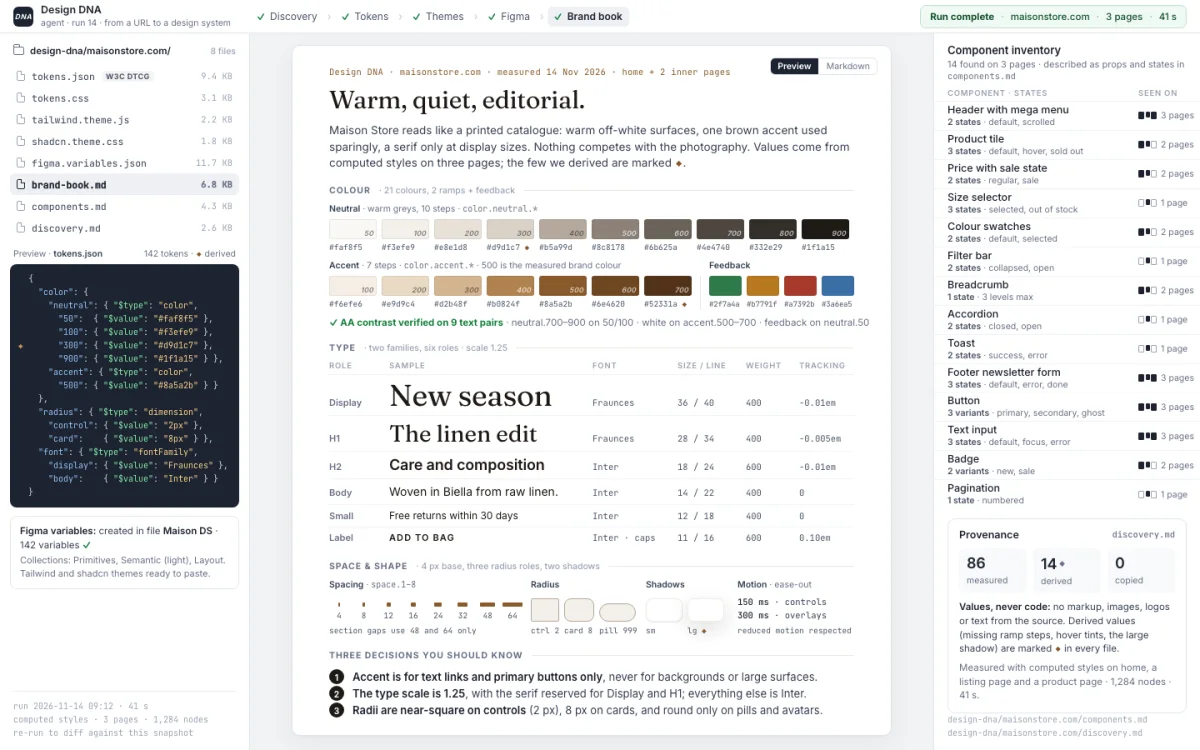
Give it the URL of a site and get its design DNA as a design system you can use: colour ramps, type roles and scale, spacing, radii, shadows, motion and a list of the components it has. Delivered as tokens, CSS variables, Tailwind and shadcn themes, Figma variables and a brand book in plain words. It measures values; it never copies code.
Perfect for
- Rebuilding your own site, or your client's, on a real design system instead of scattered CSS
- Starting a design system from what already exists in production
- Studying how a reference brand is built, as a palette and a type scale you can learn from
You get
- Tokens in the W3C format and every other output generated from them, so they never drift apart
- A brand book that explains the system in plain words, with the three decisions you should know
- Optionally the variables created in a Figma file, through the official connector
How it works
- Setup · once, 5 minutes
- YouPaste the prompt in a folderfive questions, "default" is an answer; it installs an open-source extractor
- Every site
- You"Extract the design DNA of mybrand.com"
- ItReads the home page and two inner pagescomputed styles and custom properties; your Chrome as fallback when a site blocks tools
- ItReduces raw values to a systemneutral and accent ramps, feedback colours, type roles and scale, grid, radius roles, shadows, motion
- Asks youVerifies contrast at AA and marks every value it derived rather than measured
- You getOne folder: tokens.json, tokens.css, Tailwind, shadcn, Figma variables, the brand book, the component inventory, the discovery note
Good to know
- Values, never code: no markup, images, logos or text from the source end up in the output
- Meant for your own site or your client's; a third-party site is a study and the brand book says so
- Undo: uninstall one npm package, delete the skill folder and one section of CLAUDE.md
In detail
Paste it in Claude Code inside a folder. It installs an open-source extractor (designlang, MIT; dembrandt as the alternative) that renders the page in headless Chromium and reads computed styles and custom properties, connects your Chrome through the Claude in Chrome extension as the fallback for sites that block headless tools, and writes the method as a project skill: read the home page and two inner pages; reduce colours in OKLCH to a neutral ramp on a 0–1000 scale, an accent ramp with the action colour checked for contrast, and feedback colours with strong, base and subtle; typography by role with weights, case rules and a type scale snapped to a minor third if you want; spacing on a 4px grid, radius roles, shadows by elevation, motion durations; a component inventory from repeated structures; a contrast table at AA; every derived value marked. The output is one folder per domain: tokens.json in the W3C format and, generated from it, tokens.css, a Tailwind v4 theme, a shadcn theme, figma.variables.json, a brand book in plain words, the inventory and the discovery note. Optionally it creates the variables in a Figma file through the official connector. Nothing proprietary is copied: no markup, assets or text, only measured values. Meant for your own site or your client's; a third-party site is a study and the brand book says so.
How to run it
Works in Claude Code. One paste, then you talk to it.
- Copy the prompt.
- Paste it as the first message of a new session in Claude Code, in the folder it should work on.
- Answer its setup questions (each has a default), then approve each step. It asks before anything risky.
Frequently asked
What does Design DNA Agent do?
Give it the URL of a site and get its design DNA as a design system you can use: colour ramps, type roles and scale, spacing, radii, shadows, motion and a list of the components it has. Delivered as tokens, CSS variables, Tailwind and shadcn themes, Figma variables and a brand book in plain words. It measures values; it never copies code.
Which coding assistants does Design DNA Agent work with?
Design DNA Agent works with Claude Code.
How do I use Design DNA Agent?
Copy the prompt with one click and paste it as the first message of a new session in Claude Code, inside the folder it should work on. It introduces itself, asks a few setup questions with defaults, and asks for your approval before anything risky. Estimated time: 5 min setup · 10–15 min per site.
What does Design DNA Agent touch, and is it safe?
It touches: Installs an npm package and a browser (medium risk); Drives your Chrome as fallback (low risk); Writes project files (medium risk); Writes to Figma (optional) (medium risk); Copies values, not code (low risk). It is reversible: the last step of the preview run explains how to undo everything. A human reviewer verified the declared scope on a sandbox project.
What do I need before running Design DNA Agent?
Claude Code. Node.js 20 or later. Optional: Chrome or Edge with the Claude in Chrome extension, for sites that block headless tools. Optional: the Figma connector, to create the variables in a file.
Is Design DNA Agent free, and how is it licensed?
Yes. Every prompt in the GoPrompt catalogue is free to copy and use for personal and internal work under the GoPrompt Licence 1.0 (personal and internal use. no resale, no redistribution.). Current version 1.0.0, last updated 2026-11-12.