Senior UX Auditor Agent
A senior UX auditor inside Claude Code. One paste sets it up; then you name a site and a flow and it walks it in your Chrome on desktop and mobile, captures evidence step by step and hands you a report: findings rated by severity, the heuristic or WCAG criterion behind each one, and what to do about it.
 Vito Antonacci @vitoantonacci · 14 prompts
What you get
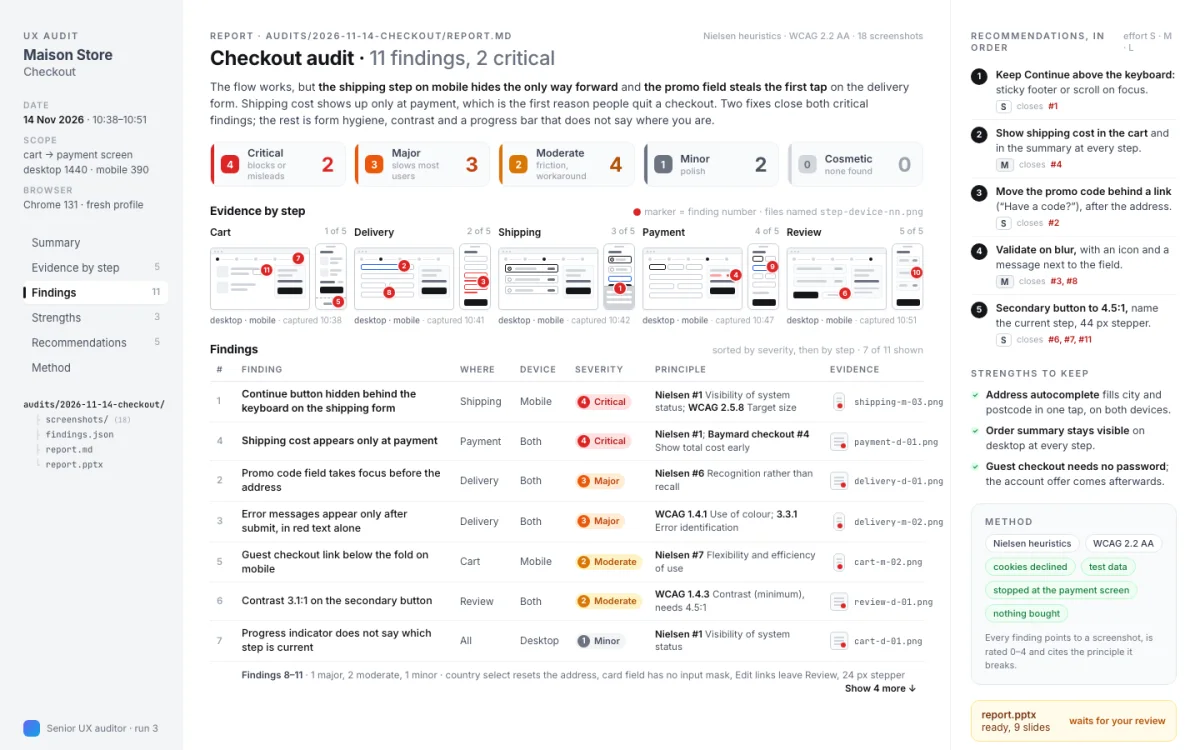
A senior UX auditor inside Claude Code. Name a site and a flow, and it walks it in your Chrome on desktop and mobile, screenshot by screenshot, then tells you what gets in the user's way, how serious each problem is and what to do about it. Evidence first: no finding without a screenshot.
Perfect for
- A checkout, sign-up or search flow that converts worse than it should
- A second opinion on a design before it ships, with evidence a team cannot argue with
- An accessibility check that cites the criterion, not just "contrast is low"
You get
- One folder per audit: screenshots, a structured findings file and a readable report
- Findings a designer can act on: what, where, why, how serious, what to change
- Strengths too, so the team knows what to keep
How it works
- Setup · once, 5 minutes
- YouPaste the prompt in a folderfive questions, "default" is an answer; Chrome connects through the Claude in Chrome extension
- Every audit
- You"Audit the checkout of this site, desktop and mobile, from cart to the payment screen"
- ItWalks the flow like a visitorcookies declined, test data, the real viewports measured, every step captured on both devices
- ItJudges only what the screenshots showNielsen heuristics and WCAG 2.2, each finding rated 0–4 for severity, with the principle behind it
- Asks youCross-checks itselfevery finding points to a screenshot, no duplicates, severities consistent across devices
- You getA report with the step-by-step evidence, a severity table and ordered recommendationsa PowerPoint too if you asked
Good to know
- It never creates accounts, never types passwords, never pays: it stops at the payment screen
- Without Chrome, you provide the screenshots and the method still applies
- Undo: delete three skill folders and one section of CLAUDE.md
In detail
Paste it in Claude Code inside an empty or existing folder. It connects your Chrome through the official Claude in Chrome extension (no separate browser server), installs two MIT-licensed audit skills as the reference library (Nielsen heuristics with a cognitive walkthrough; WCAG 2.2 with success-criterion citations) and writes the audit method as a project skill: scope the flow as a sequence of states, measure the real viewports, walk the flow like a visitor with cookies declined and test data only, capture the viewport at every step on both devices, judge only what the screenshots show, rate severity 0–4 as frequency × impact × persistence, cross-check that every finding points to a screenshot, then write findings.json and a report with the step-by-step evidence, a severity table, ordered recommendations, strengths and sources; a PowerPoint if you asked for one. Conduct on live sites is part of the skill: never an account, never a password, never a payment. After a session restart you say "audit the checkout of this site on mobile" and the whole audit runs.
How to run it
Works in Claude Code. One paste, then you talk to it.
- Copy the prompt.
- Paste it as the first message of a new session in Claude Code, in the folder it should work on.
- Answer its setup questions (each has a default), then approve each step. It asks before anything risky.
Frequently asked
What does Senior UX Auditor Agent do?
A senior UX auditor inside Claude Code. Name a site and a flow, and it walks it in your Chrome on desktop and mobile, screenshot by screenshot, then tells you what gets in the user's way, how serious each problem is and what to do about it. Evidence first: no finding without a screenshot.
Which coding assistants does Senior UX Auditor Agent work with?
Senior UX Auditor Agent works with Claude Code.
How do I use Senior UX Auditor Agent?
Copy the prompt with one click and paste it as the first message of a new session in Claude Code, inside the folder it should work on. It introduces itself, asks a few setup questions with defaults, and asks for your approval before anything risky. Estimated time: 5 min setup · 20–40 min per audit.
What does Senior UX Auditor Agent touch, and is it safe?
It touches: Drives your Chrome (low risk); Writes project files (medium risk); Clones two public repositories (low risk); No keys, no accounts (low risk). It is reversible: the last step of the preview run explains how to undo everything. A human reviewer verified the declared scope on a sandbox project.
What do I need before running Senior UX Auditor Agent?
Claude Code. Google Chrome or Edge with the Claude in Chrome extension (it guides the setup; without it, you provide the screenshots). git. Optional: a presentation skill for the PowerPoint deliverable.
Is Senior UX Auditor Agent free, and how is it licensed?
Yes. Every prompt in the GoPrompt catalogue is free to copy and use for personal and internal work under the GoPrompt Licence 1.0 (personal and internal use. no resale, no redistribution.). Current version 1.0.0, last updated 2026-11-13.