GTM Agent
Keeps your GTM container clean and builds what you ask: tags, triggers and variables from plain language, prepared in a workspace, tested in Preview, published only by you.
 Vito Antonacci @vitoantonacci · 14 prompts
What you get
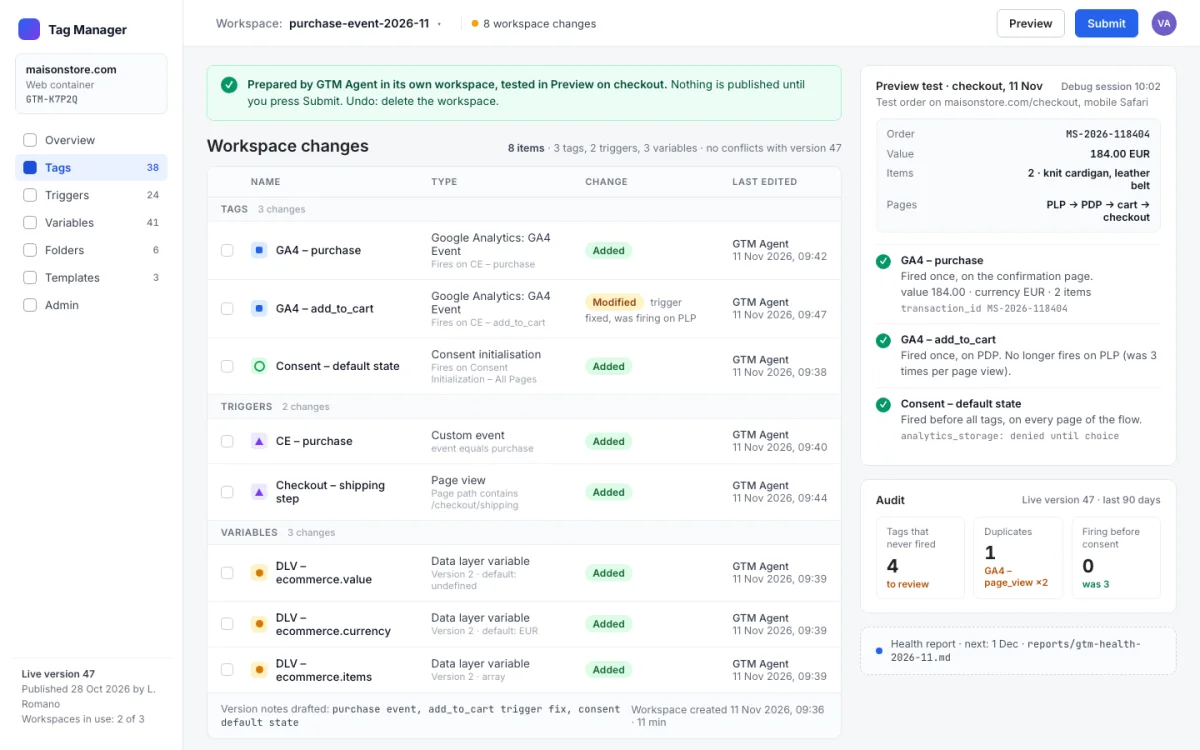
Your Google Tag Manager container kept clean and built from plain language. Tags, triggers and variables are prepared in a separate workspace, tested in Preview, and published only by you.
Perfect for
- Adding or fixing tracking without waiting for a developer or an agency
- Cleaning up a container nobody dares to touch
- Knowing every month what fires and what is broken
You get
- Clean, documented tags; audits you can act on; a monthly health report
How it works
- Setup · once
- YouPaste the promptit reads your whole container and runs a first audit: tags that never fire, duplicates, tags firing before consent
- Every change
- You"Add a purchase event with value and currency"or "why is add to cart not firing on product pages?"
- ItPrepares it in its own workspacenever in the one you work in; every change shown before it is made
- Asks youTests in Preview mode on your siteand asks before applying any fix it found
- You getA workspace ready to publishyou press publish; a health report every month
Good to know
- Nothing is published without you
- Undo: delete the workspace
In detail
Paste it once: it connects Google Tag Manager through MCP (or the Claude in Chrome extension), reads the whole container, builds the inventory and the tracking plan, runs a first audit and saves the skills. From then on you ask in plain language: "add a purchase event with value and currency", "clean up the container", "why is add_to_cart not firing on PDP", "test the checkout tags". It writes the spec as a table, reuses what exists, reads the data layer on the site instead of guessing, prepares everything in a dedicated workspace, shows the diff, applies after your ok, tests in Preview mode and DebugView, and hands you the workspace ready to publish. Deletions go through a 30-day quarantine. A monthly health report shows how the container evolves.
How to run it
Works in Claude Code, Claude Desktop. One paste, then you talk to it.
- Copy the prompt.
- Paste it as the first message of a new session in Claude Code, in the folder it should work on.
- Answer its setup questions (each has a default), then approve each step. It asks before anything risky.
Frequently asked
What does GTM Agent do?
Your Google Tag Manager container kept clean and built from plain language. Tags, triggers and variables are prepared in a separate workspace, tested in Preview, and published only by you.
Which coding assistants does GTM Agent work with?
GTM Agent works with Claude Code and Claude Desktop.
How do I use GTM Agent?
Copy the prompt with one click and paste it as the first message of a new session in Claude Code, inside the folder it should work on. It introduces itself, asks a few setup questions with defaults, and asks for your approval before anything risky. Estimated time: 10 min per change · audit once · monthly report automatic.
What does GTM Agent touch, and is it safe?
It touches: Reads the GTM container and the site (low risk); Creates and edits GTM workspaces (medium risk); Writes context, tests and reports (low risk). It is reversible: the last step of the preview run explains how to undo everything. A human reviewer verified the declared scope on a sandbox project.
What do I need before running GTM Agent?
GTM container with edit access. Tag Manager MCP connection, or the Claude in Chrome extension logged into GTM. The site reachable in a browser for Preview mode.
Is GTM Agent free, and how is it licensed?
Yes. Every prompt in the GoPrompt catalogue is free to copy and use for personal and internal work under the GoPrompt Licence 1.0 (personal and internal use. no resale, no redistribution.). Current version 2.0.0, last updated 2026-11-07.