Jira Agent
Sets up a Jira agent in your assistant once (Jira and Figma via MCP, saved skills, ticket style). Then you say what to open, from Figma or in your words, check the preview, approve, and everything is created in Jira automatically.
 Vito Antonacci @vitoantonacci · 14 prompts
What you get
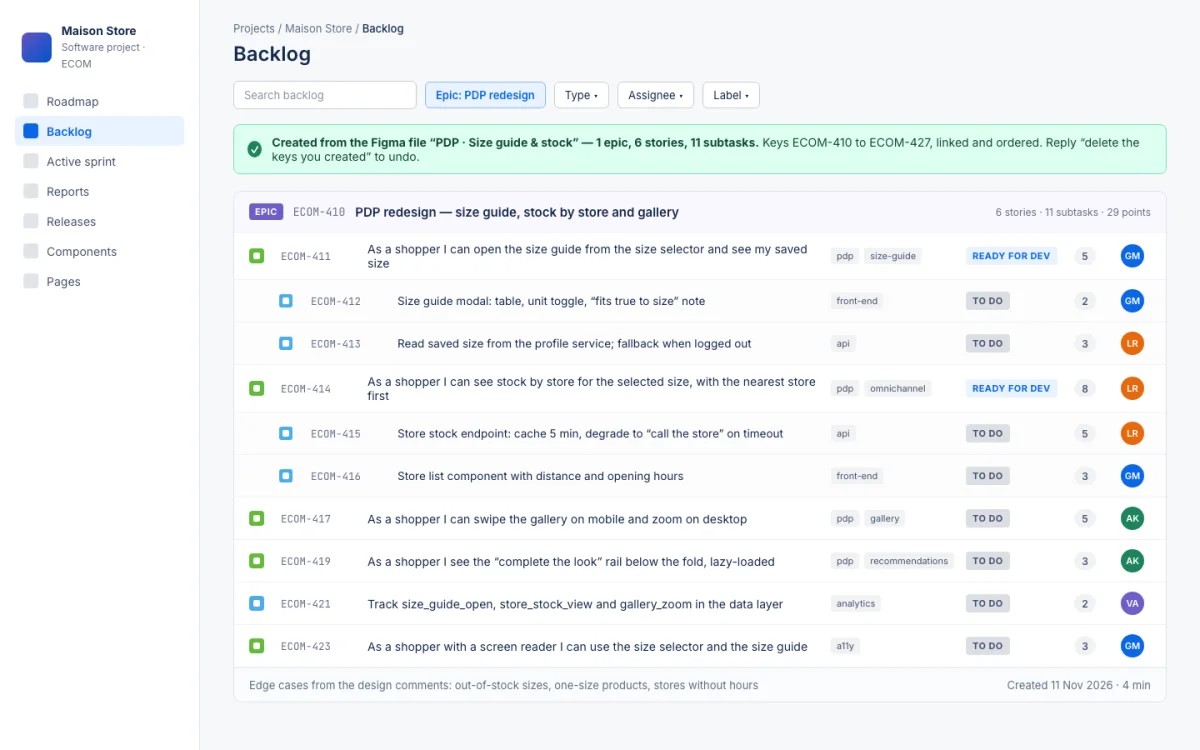
Your backlog, written for you. Say what to open, from a Figma link or in your own words, check the preview, approve: every epic, story and task appears in Jira, linked and in order.
Perfect for
- Turning a finished design into tickets the same day
- Tickets in one style and one language, whoever asks for them
- Design-to-development handoff without a week of writing
You get
- Epics, stories, tasks and subtasks with acceptance criteria, in your style
- A preview before anything is created
How it works
- Setup · once
- YouPaste the promptfive questions with defaults: your Jira project, language, ticket style, Figma yes or no
- Every feature
- You"Backlog for the new product page, from this Figma link"plus any notes you have
- ItReads the designscreens, components, flows, edge cases, open comments
- Asks youShows the full previewepic, stories, tasks; you split, merge or reword before anything is created
- You getEverything in Jira in about four minuteskeys printed, linked and ordered
Good to know
- Nothing reaches Jira before your ok
- Undo: "delete the keys you created" removes only those
In detail
Paste it once. It introduces itself, shows how you will work together and asks five setup questions with defaults: default Jira project, ticket language, Figma yes or no, ticket style, team prefix for titles. It makes sure Jira is connected via the official Atlassian connector (and guides the setup if not), connects Figma if you want to read designs directly, creates the "Jira agent" project inside your assistant and saves three skills: how to analyse a design, how to write a ticket, how to create in Jira. From then on every request is one message: "open a ticket for X", "backlog for the new PDP from this Figma", plus your notes. It analyses every screen (components, states, UX flow, comments), shows a preview of every ticket in chat, revises on your comments, and on your approval creates Epic, Stories, Tasks and Subtasks in Jira automatically, linked and ordered, and prints the keys. Developer-first ticket style: goal in the user's first person, a context paragraph readable without opening Figma, 3–6 scope bullets, notes only when you provided them, Given/When/Then criteria. Priority left empty on purpose. First run: 23 tickets in 4 minutes instead of 1.5 hours.
How to run it
Works in Claude Code, Claude Desktop. One paste, then you talk to it.
- Copy the prompt.
- Paste it as the first message of a new session in Claude Code, in the folder it should work on.
- Answer its setup questions (each has a default), then approve each step. It asks before anything risky.
Frequently asked
What does Jira Agent do?
Your backlog, written for you. Say what to open, from a Figma link or in your own words, check the preview, approve: every epic, story and task appears in Jira, linked and in order.
Which coding assistants does Jira Agent work with?
Jira Agent works with Claude Code and Claude Desktop.
How do I use Jira Agent?
Copy the prompt with one click and paste it as the first message of a new session in Claude Code, inside the folder it should work on. It introduces itself, asks a few setup questions with defaults, and asks for your approval before anything risky. Estimated time: 4 min per feature.
What does Jira Agent touch, and is it safe?
It touches: Creates tickets in Jira automatically (high risk); Reads Figma (low risk); Creates a project and 3 skills in your assistant (low risk). It is reversible: the last step of the preview run explains how to undo everything. A human reviewer verified the declared scope on a sandbox project.
What do I need before running Jira Agent?
Jira connected via the official Atlassian MCP connector (it guides the setup if missing). Optional: Figma MCP (read) to read the designs directly. Approved designs, or a clear description of the feature in chat.
Is Jira Agent free, and how is it licensed?
Yes. Every prompt in the GoPrompt catalogue is free to copy and use for personal and internal work under the GoPrompt Licence 1.0 (personal and internal use. no resale, no redistribution.). Current version 3.1.0, last updated 2026-11-09.