UX Benchmark Agent
Sets up a UX benchmark analyst in your assistant once (browser, PowerPoint, skills, your sector and reference sites). Then "benchmark the size guide" gives you ~20 best-in-sector sites, 3–4 screens per device showing the flow, each annotated with sourced best practice, in a modern PowerPoint.
 Vito Antonacci @vitoantonacci · 14 prompts
What you get
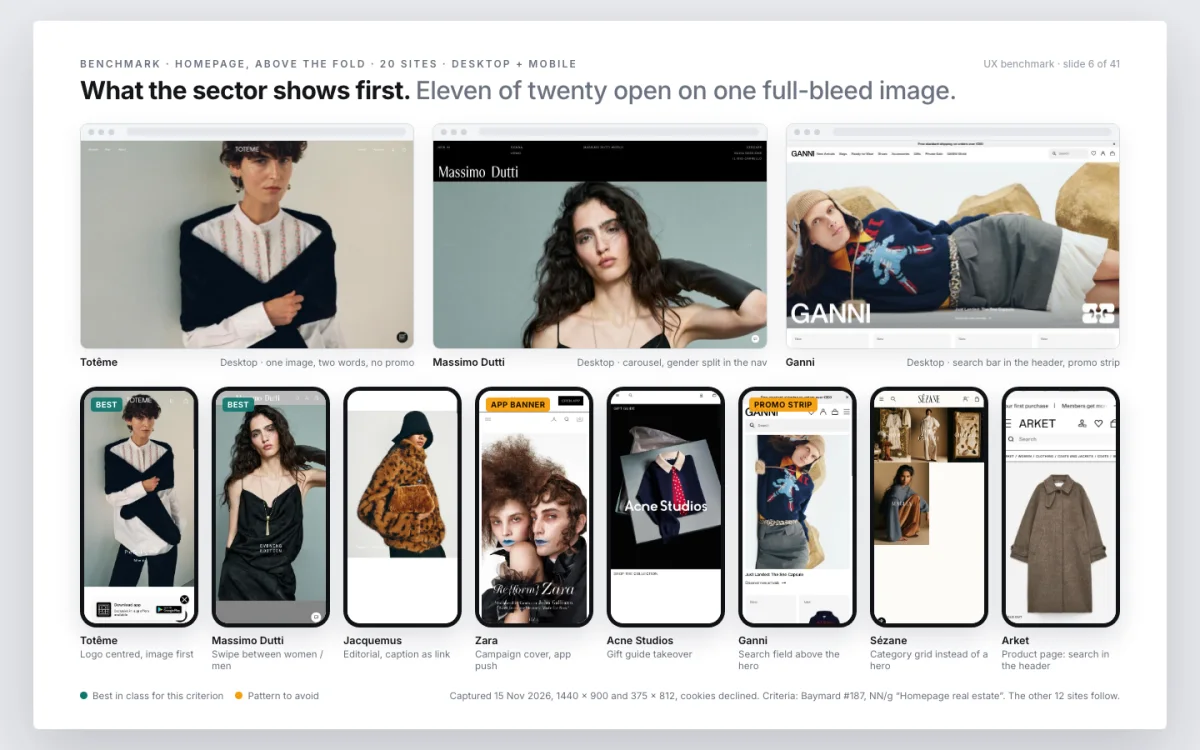
One sentence, "benchmark the size guide", and you get a PowerPoint showing how the best sites in your sector do it, screen by screen, with the UX principle behind each choice.
Perfect for
- "How do the others do it?" before a redesign
- Backing a design decision with evidence from real sites
- A benchmark deck for stakeholders without a week of screenshots
You get
- A .pptx in your working folder, ready to present; one page in Figma if you asked for it
- Screens that show the flow, not static shots, each with sourced best practice
How it works
- Setup · once
- YouPaste the prompttell it your sector, the sites you compare yourself with, desktop and mobile or just one
- Every benchmark
- You"Benchmark the size guide on product pages, desktop and mobile"one section or one flow
- ItVisits about 20 best-in-sector sitesand captures the flow on each device, three or four screens per site
- ItJudges them against 10–12 criteriafrom Baymard, Nielsen Norman Group and Laws of UX, sources linked
- You getA PowerPointone site per group of slides, annotated; the key patterns summarised in chat
Good to know
- It only looks: cookies declined, no accounts, no forms, nothing bought
- Undo: delete the file
In detail
Paste it once. It introduces itself, shows how you will work together and asks seven setup questions with defaults: your sector, your reference sites (fewer than 40–50 and it completes the list coherently; none and it picks the best of the sector), default devices, PowerPoint with or without Figma. It checks the browser connector, the presentation tool and the best UX research skills, creates the "UX benchmark" project in your assistant and saves the method as a skill. From then on every request is one line: "benchmark the size guide", "compare checkout on mobile". It selects about 20 sites, builds an evaluation frame from Baymard, NN/g, W3C, Laws of UX and recognised practitioners with links, walks the real flow on every site capturing 3–4 screens per device, annotates each screen with the rules it meets or breaks and their sources, and delivers a modern, minimal PowerPoint with patterns, do and don't and next steps. No scores or rankings: you decide what matters. A day of work becomes under an hour.
How to run it
Works in Claude Code, Claude Desktop. One paste, then you talk to it.
- Copy the prompt.
- Paste it as the first message of a new session in Claude Code, in the folder it should work on.
- Answer its setup questions (each has a default), then approve each step. It asks before anything risky.
Frequently asked
What does UX Benchmark Agent do?
One sentence, "benchmark the size guide", and you get a PowerPoint showing how the best sites in your sector do it, screen by screen, with the UX principle behind each choice.
Which coding assistants does UX Benchmark Agent work with?
UX Benchmark Agent works with Claude Code and Claude Desktop.
How do I use UX Benchmark Agent?
Copy the prompt with one click and paste it as the first message of a new session in Claude Code, inside the folder it should work on. It introduces itself, asks a few setup questions with defaults, and asks for your approval before anything risky. Estimated time: 30–60 min per section.
What does UX Benchmark Agent touch, and is it safe?
It touches: Creates a PowerPoint file (low risk); Writes a page to Figma (optional) (medium risk); Browses public competitor sites (low risk); Installs skills (low risk). It is reversible: the last step of the preview run explains how to undo everything. A human reviewer verified the declared scope on a sandbox project.
What do I need before running UX Benchmark Agent?
A browser connector (built-in browser or Chrome connector); it guides the setup if missing. A PowerPoint generation skill or tool; it installs one if missing. Optional: Figma MCP with write access to one file. Optional: your reference sites, or just the sector.
Is UX Benchmark Agent free, and how is it licensed?
Yes. Every prompt in the GoPrompt catalogue is free to copy and use for personal and internal work under the GoPrompt Licence 1.0 (personal and internal use. no resale, no redistribution.). Current version 3.0.0, last updated 2026-11-10.